Why a Screen Can Feel Larger Than Its Measurements
Screen size perception depends on contrast, visual boundaries, and nearby objects. Learn how to judge a display in its room before choosing by measurements.
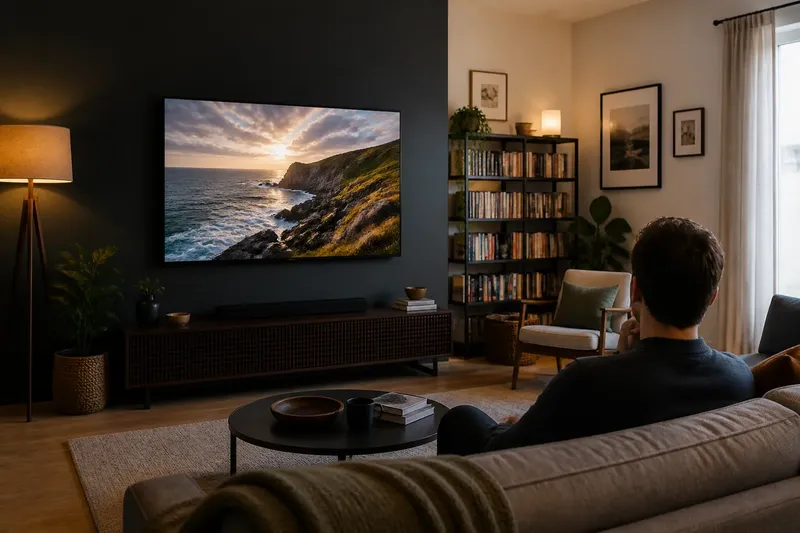
A screen can feel larger than its measurements when its bright image dominates a dark wall, while a bigger display can seem modest beside broad furniture. Screen size perception depends on more than the panel’s dimensions: contrast, surrounding objects, and the amount of uninterrupted image all shape what the eye reads as scale. To assess a display, look at the whole wall and room, not just the product listing.
Why can a smaller screen look bigger in a room?
A smaller screen can appear larger when it draws more attention than everything around it. The eye notices strong differences in brightness and color, so a luminous rectangle against a dark, quiet background can command the wall. A larger panel surrounded by bright artwork, shelves, or a pale wall may attract less attention and seem less dominant.
This is a difference between physical size and visual weight. Physical size is set by the panel’s actual width and height. Visual weight describes how much attention it claims in its setting. A high-contrast screen can carry substantial visual weight without extending far across the wall.
Imagine a modest display on a charcoal wall, with no nearby objects and a bright image on screen. Now place a physically larger display on a white wall beside a tall bookcase and framed prints. The first may feel like the main event, while the second reads as one element in a busier composition. Neither has changed dimensions; their visual surroundings have changed.
How does contrast change perceived screen size?
Contrast makes an object’s edges and contents easier to notice. A bright screen in a dim room separates sharply from its surroundings, so the eye can register the entire rectangle at once. When the display is off, or its image is dark, its edge may blend into the wall and the apparent area can recede.
Contrast is not only a matter of screen brightness. A dark panel against a light wall creates a strong outline even when the display is off. A dark wall can reduce that outer boundary, but a vivid image may still stand out once the screen is on. The effect depends on what is visible and on the room’s overall light, not on one fixed setting.
Consider the wall color, nearby lamps, windows, and the image people usually watch. If the screen is intended to remain visually quiet when unused, a wall tone close to the panel’s dark border may soften its outline. If a clear focal point is desirable, more contrast can help the display read as a deliberate center. These are different visual choices, not changes to the screen itself.
What does uninterrupted visual area have to do with scale?
A broad, unbroken image often feels larger than an equally sized image divided by visual interruptions. The eye can take in a continuous field as one object. Thick bezels, visible gaps between panels, overlays, or nearby edges that seem to cut across the display can make that field feel fragmented.
Surroundings matter even when they do not cover the screen. A narrow shelf aligned with the panel’s middle can compete with its horizontal edge. A cluster of small frames around it may divide the wall into separate pieces. By contrast, a clear margin around the display gives its outline room to register and can make its full area easier to read.
Think of the screen as a sheet of paper on a desk. The same sheet looks more expansive on a clear tabletop than amid scattered papers and tools. The paper has not grown; the uninterrupted area makes its boundaries easier to follow. A display works similarly, though its light and moving image add another source of attention.
How do nearby objects affect the display’s scale?
Objects provide visual comparisons. A screen beside a tall cabinet may seem compact, while the same screen above a low console can seem broad. Large objects can make a display look small through direct comparison, but a dense collection of small objects can also make it feel oversized by crowding its edges.
Look at more than the object immediately below the screen. A floor lamp, door frame, window, plant, and shelving all contribute to the wall’s visual balance. Repeated horizontal lines can make a display appear wider; tall vertical forms can emphasize its height or make its width seem less prominent. These relationships depend on the composition, not on a universal rule about which furniture belongs near a screen.
Try a simple room sketch or temporarily outline the proposed panel area with painter’s tape. Include the console, shelves, and major nearby objects, then view the arrangement from the seats people use. The outline is not a substitute for exact product dimensions, but it helps reveal whether the screen would sit in a calm area or compete with a crowded cluster.
Does the wall behind the screen make it seem larger?
Yes. A large, empty wall can make a display feel small because its edges have so much open space around them. A compact wall section bounded by a doorway, built-in shelves, or a corner can make the same display seem more substantial. The apparent scale is relative to the visible area available to it.
There is no single ideal amount of empty wall. Generous space can make a screen feel composed and intentional. A tighter setting may feel cozy, but if the panel nearly touches other visual elements, its boundaries can become harder to distinguish. Look for a margin that allows the display to read clearly without making the rest of the wall seem accidentally bare.
Also notice what appears in the viewer’s peripheral vision. A bright window near the screen can compete for attention; a dark passage may make the display feel more prominent. The view from a seat matters more than a straight-on product image because it includes the nearby room and its competing edges.
How can I judge screen size before choosing a display?
Judge the proposed screen in the room’s actual context, from the places where people will use it. Measurements tell you whether a display fits a wall or furniture arrangement. A visual mock-up helps answer a separate question: how much attention will it command?
- Mark the outer dimensions. Use painter’s tape to outline the panel’s width and height, including the bezel if known. Step back to the usual viewing position and check whether the outline feels too dominant, too small, or balanced.
- Check the surrounding contrast. Notice whether the wall and nearby objects are much lighter or darker than the display. Consider how the screen will look both when active and when dark.
- Inspect the visual margins. Look for shelves, frames, lamps, and doorways close to the proposed edges. Decide whether they frame the display or make its outline difficult to follow.
- Compare nearby objects. View the outline beside the console, bookcase, or window rather than in isolation. Ask whether the screen becomes a clear focal point or seems unexpectedly small among larger forms.
- Review more than one seat. Check the view from the main sofa and any secondary seating. An angle can bring a doorway, lamp, or bright window into the composition and change which object draws attention.
- Consider the usual image. A bright menu, a dark film scene, and a paused screen do not carry identical visual weight. Think about the display in the states people are likely to see most often.
Say you are considering a display for a living-room wall above a low console. You tape the proposed outline, then notice that a tall plant and a bright window crowd one side. Moving the plant farther from the outline and choosing a less visually busy arrangement around the window would let you judge the screen’s boundaries more clearly before making a purchase. The expected observable result is a wall where the panel reads as a distinct object rather than one more competing shape.
Why can screen size perception change when the display is off?
An inactive screen loses its bright image, motion, and color, so the dark panel and bezel become the main cues. Against a pale wall, that rectangle may still be sharply defined. Against a dark wall, its boundary can recede, making the display feel less prominent than it does during use.
That shift is useful to consider in shared rooms where the screen is not always on. A display that dominates while playing video may become a quiet dark surface between uses. Conversely, a large black rectangle can remain visually forceful on a light wall even when inactive. Decide which state matters more to the room’s everyday appearance, while recognizing that both are part of the experience.
What questions help me judge screen size perception?
Does a darker wall always make a screen look smaller?
No. A dark wall may soften the panel’s outer boundary, but a bright image can still stand out strongly. The result depends on the display’s content, the room lighting, and nearby objects.
Can a large screen look small beside large furniture?
Yes. A wide cabinet or broad bank of shelves gives the eye a larger reference, so the screen may seem less substantial by comparison. The relationship is especially noticeable when their edges align or form a continuous horizontal band.
Should I choose a display based only on its wall fit?
No. Wall fit answers whether the panel can occupy the space, while visual context helps you judge how prominent it will feel. Consider both the dimensions and the room’s contrast, margins, and surrounding forms.
Will a screen seem the same size from every seat?
Not necessarily. A viewing angle can compress the apparent shape, and a different seat may bring bright or oversized objects into the composition. Check the display from the positions people actually use.
Which room details matter most when comparing displays?
Start with the view from the main seat, then identify the elements that frame or compete with the panel. Contrast determines how strongly its boundaries stand out. Uninterrupted area affects whether the image reads as one field. Nearby objects establish comparisons that can make the same display seem large, small, or balanced.
Use those observations alongside the actual measurements, not in place of them. If a taped outline feels too dominant, consider whether the problem is the panel’s dimensions or a crowded, high-contrast wall. If it seems undersized, look for a broad empty surface or large neighboring objects that are setting an unhelpful comparison. Screen size perception becomes easier to judge once you can name the visual cause rather than relying on a vague sense that the display is simply too much or too little.
Before settling on a screen, leave the outline in place while viewing the room in its usual lighting and with its ordinary furnishings. That final look can reveal whether the display belongs to the room’s composition when active and inactive—and whether the surrounding space gives its size a clear, comfortable context.